Wednesday, 19 October 2011

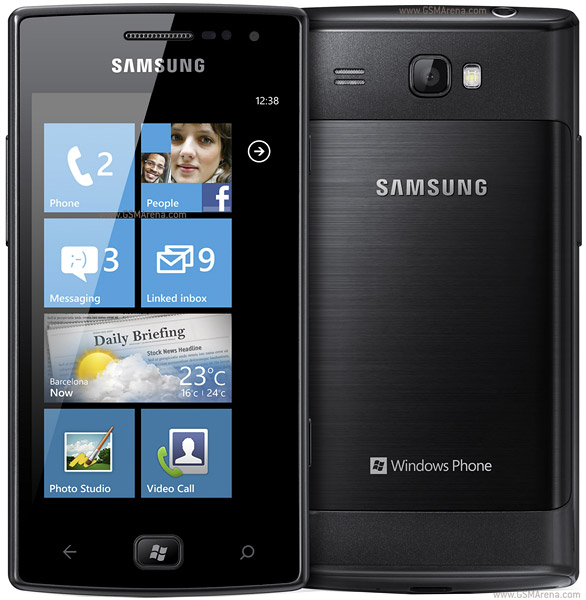
Samsung announces Omnia W, we go hands-on


Windows phone 7 Mango update is coming any moment now and so are the first phones that will have it stock right out of the box. HTC has already announced the Mango-based Titan and Radar, so today is the Samsung's turn - meet the Omnia W.
The Omnia W packs a 3.7-inch WVGA Super AMOLED screen and is based on the Qualcomm MSM8255 Snapdragon chipset with a 1.4GHz Scorpion processor, Adreno 205 graphics and 512MB RAM. Since Microsoft has strict policy about the hardware there is very little space Samsung to innovate.
    
Samsung Omnia W official pictures
The rest of the specs are pretty much standard - a 5 megapixel snapper with a LED flash, a 720p camcorder, a front-facing VGA camera, 8GB internal storage, a 1500mAh battery and the usual connectivity (Wi-Fi, GPS, Bluetooth).
Samsung Omnia W runs on the latest Windows Phone 7 Mango version and there are just few Samsung apps you can download for free to get something unique with your phone, since Microsoft forbids customizations.
According to GSMInfo.nl the Omnia W is expected this November for about €450 for the unlocked device.
We also got a chance to play around with the Omnia W. It's nicely compact and not too heavy. The battery cover is made out of brushed metal (a nice touch!) but the rest of the body is plastic. Still, the Omnia W feels solidly built.
       
Samsung Omnia W live pictures
On the front, there's the 3.7" SuperAMOLED screen with WVGA resolution. Below that is the Windows key flanked by capacitive back and search keys. There's a half-pressable shutter key on the side as it's customary for Windows Phones.
Unfortunately, the phone had a rather bad case of a dead battery, so we can’t share any impressions about actually using the phone. We bet, however, it won't be long before we get one-on-one with the Omnia W again.

GENERAL2G NetworkGSM 850 / 900 / 1800 / 1900
3G NetworkHSDPA 900 / 2100
Announced2011, September
StatusAvailable. Released 2011, October
SIZEDimensions115.6 x 58.8 x 10.9 mm
Weight115.3 g
DISPLAYTypeSuper AMOLED capacitive touchscreen, 16M colors
Size480 x 800 pixels, 3.7 inches (~252 ppi pixel density)
 - Multi-touch input method
- Accelerometer sensor for UI auto-rotate
- Proximity sensor for auto turn-off
- Gyro sensor
SOUNDAlert typesVibration, MP3, WAV ringtones
LoudspeakerYes
3.5mm jackYes
MEMORYPhonebookPractically unlimited entries and fields, Photocall
Call recordsPractically unlimited
Internal8 GB storage, 512 MB RAM
Card slotNo
DATAGPRSYes
EDGEYes
3GHSDPA, 14.4 Mbps; HSUPA, 5.76 Mbps
WLANWi-Fi 802.11 b/g/n
BluetoothYes, v2.1 with A2DP
Infrared portNo
USBYes, microUSB v2.0
CAMERAPrimary5 MP, 2592 x 1944 pixels, autofocus, LED flash
FeaturesGeo-tagging, image stabilization
VideoYes, 720p@30fps
SecondaryYes, VGA
FEATURESOSMicrosoft Windows Phone 7.5 Mango
CPU1.4 GHz processor
MessagingSMS (threaded view), MMS, Email, Push Email, IM
BrowserHTML
RadioStereo FM radio with RDS
GamesYes + downloadable
ColorsBlack
GPSYes, with A-GPS support, Bing map
JavaNo
 - Digital compass
- Microsoft office document viewer/editor
- MP4/WMV/H.264/H.263 player
- MP3/WAV/WMA/eAAC+ player
- SNS integration
- Organizer
- Voice memo
- Predictive text input

BATTERY Standard battery, Li-Ion 1500 mAh


Expected Price : 17,000

http://www.samsung.com/global/microsite/omnia/#/gate/omnia7


Motorola DROID RAZR image leaks before launch


We're about twelve hours away from the Motorola event where they will be announcing the new DROID RAZR. Of course, they never mentioned the name of the device but the previous leaks and the teaser video provided enough clues. But if you think they were not enough, here comes the actual image of the phone.

This image was discovered by Droid-Life.com on Motorola's teaser site and gives us a good look at the new DROID RAZR. Well that's one name full of history. It must be said that it is indeed an attractive looking design, particularly the back with that sweet looking Carbon fiber adorning it.
You can also see the 4G LTE logo on the back, along with certain other details such as the FCC ID, which suggests that the battery is sealed. The back swiftly rises to a bulge near the top, where you can find the camera lens that claims to do 1080p video along with an LED flash and a loudspeaker.
On the side we can see the volume control keys and the power/lock key. The top has the headphone jack, USB port and what could be a microHDMI port.
The front also looks quite attractive, with a flush (Gorilla?) glass. We can see the front facing camera above the display and the four control keys and the microphone below. The display doesn't seem particularly big or maybe the phone is just too wide.
As for the rest of the details, we'll find those out soon enough.

Android 4.0 Ice Cream Sandwich announced ..


The Google and Samsung is currently underway in Hong Kong. We're expecting to see the announcement of the Galaxy Nexus anytime now.
Andy Rubin just made the Google Nexus official. You can read about it in detail here.
 
Ice Cream Sandwich now has a cool looking lockscreen and homescreen with new font and animations. The UI looks a lot similar to Honeycomb and to all the leaks we saw before.
The homescreen folders have been improved and now much better. You can just drag icons on another and create a folder. You can then drag icons around inside the folder. You can also drag the folder to the bottom of the screen to the dock for quick access.
The notifications screen has got some nice improvements. It now has icons for the respective items and music player controls. You can also remove items from the notifications screen by swiping left or right on them. Also, the new notifications screen can be access from the lockscreen as well.
Ice Cream Sandwich can now unlock the screen by recognizing your face. Unfortunately, it did not work so well at the event. Actually, it did not work at all.
The browser has been improved. It shows large icons that you can scroll through vertically for your open browser windows. The browser loads the mobile optimized version of the site by default but you can request the desktop version of the site through the browser. Also, they have finally added the ability to sync bookmarks with the desktop Chrome browser. Also, there is a new incognito mode in the browse. Lastly, you can save pages to be viewed offline later, the way you can in Opera Mobie/Mini.
There is a new mail app and it now allows you to search in offline mode as well. There's also a new redesigned calendar app that features new swipe gesture navigation and multitouch pinch to zoom gestures.
You can now track your data usage on the phone, see how much data was used and which app has been using how much. Very handy.
There is a new camera app that can be launched from the home screen. It has a new interface and new features such as face detection and panorama mode. The video part is improved as well. It has continuous auto-focus, zoom while recording, ability to take snapshot while recording a video and time lapse video.
 
New People (contacts) app with some nice large, high resolution pictures for your favorite contacts. You can see updates from your contacts pulled from different social networking sites within the People app, just like on Windows Phone 7. Also, nearly fullscreen picture of people when you call them.
The new Android Beam feature transfers content across devices with NFC by simply touching them together. You can transfer data such as webpages, people cards, maps location, YouTube videos, and apps.
Android 4.0 SDK is now available on developer.android.com. That's all for this event. Stay tuned for more info on the new Galaxy Nexus and Ice Cream Sandwich on GSMArena.com.
You should also check out this video showing the key features in Ice Cream Sandwich. After that, head to our in-depth first-look of Android 4.0 Ice Cream Sandwich.

Samsung Galaxy Nexus is finally official, comes in November


Finally, the news the whole Android community has been waiting for has arrived! Samsung and Google announced in their Unpacked event in Hong Kong the Samsung Galaxy Nexus.
It's been a heavy rumor period for the device, as the Galaxy Nexus leaked on a few occasions and most of what Samsung just announced isn't a particular surprise, but, at least it is now official! The device is the first one of many more to come to run the newest version of the Android OS - Ice Cream Sandwich.
It is also the every first smartphone with an HD super AMOLED display, measuring at 4.65 inches boasting the resolution of 720x1280. The display is slightly curved, just like the Nexus S is, and now features a super quick response time of just 0.01ms.
 
Following the Honeycomb approach, the Galaxy Nexus lacks hardware control buttons in favor of virtual software ones, which are located on the bottom of the screen.
As we told you earlier today, under the hood the Galaxy Nexus is powered by the TI OMAP 4460 platform, boasting a 1.2GHz dual-core Cortex A9-based processor and 1GB of RAM. At the back the device packs a 5MP camera capable of shooting 1080p video, while at the front, there's the usual 1.3MP camera for video chatting. With Ice Cream Sandwich, this snapper can take and automatically stitch shots to make a panorama, shoot a time-lapse video and zoom while recording.
 
The Galaxy Nexus is fully future-proofed with LTE and NFC support on board, which should serve Google's Wallet project pretty well. Multiple carriers will be offering the smartphone in GSM HSPA version as well. The battery is now confirmed to be 1750mAh, which should keep it running for a day or two. The device will be offered in 16 or 32GB flavors expandable via a microSD card slot.
The hardware of the Galaxy Nexus is quite unique. On the bottom of the device has a hidden notification area, which glows with a green dot when you get a new email, message or miss a call. The back cover is also covered with a specially designed material called "Hyper Skin" to protect it from slipping.

Monday, 17 October 2011

12 ways Apple's iOS 5 falls short


As good as it is, the latest iPhone and iPad operating system misses the mark in several areas; here are my 12 biggest peeves


I like iOS 5 -- a lot. It has several strong improvements over the already-good iOS 4, such as notifications, improved AJAX support in the Safari mobile browser, and wireless syncing (both via Wi-Fi and through iCloud, which I believe will quickly make anywhere, anytime access an assumption iOS users impose on everything); thus, iOS extends its lead over Google's Androidand other mobile OSes. But it's by no means perfect.
Given that Apple keeps iOS updated regularly, here are what it should be working on for one of the next versions. Some of these are old requests -- odd omissions that seem less and less supportable, considering the other capabilities in iOS 5 and in the new iCloud service.

1. A "return to app" gesture. iOS 5 brings Mac OS X Lion-like multitasking gestures for navigating among apps without needing to use the Home button. For example, a four-finger sideways swipe moves you to the next or previous app that's running (depending on the swipe direction), and a four-finger swipe up exposes the multitasking dock that shows apps in operation and has controls over iTunes, AirPlay, and rotation lock or mute (whichever one is not set for control by the side switch). Then there's the four-finger pinch gesture to open the home screen. But there's no easy way to return to the app you were running before you opened the home screen. When the home screen is visible, the four-finger swipes simply scroll the home screens. How about designating the four-finger expand move as the "return to app" gesture?
2. Support for group creation and editing in contacts. One of the main uses of a mobile device in the field is communicating, which includes managing the information on the people at the other end of the line. It's very odd that iOS 5 still doesn't let you create and edit groups in the Contacts app, and it still won't let you send an email to everyone in a group by entering that group name in the To field; instead, you have to select each person in the group separately. iOS 5 imports groups from Exchange, Outlook, and Mac OS X's Address Book. You can edit every other attribute of your contacts and even link cards (such as for spouses who have different last names) -- so why not groups? iOS 5 finally introduced album creation to the Photos app, so I don't see why it won't do essentially the same thing for contacts.
3. Customized email signatures per account. As smartphones and tablets are increasingly used for both work and personal purposes, having a single email signature for all accounts handled in iOS's Mail app makes no sense. You should be able to set a separate signature per account, just as you can in Apple's Mail client in Mac OS X -- or in Outlook in Windows and Mac OS X.
4. Mail filtering. Still on the email front, iOS 5 does not support message filtering, such as to automatically trash all emails tagged as junk by your server or to move all emails from your boss to a specified folder. iPhones and iPads certainly have the processing power to do this, and Apple has such filtering tools in its Mail client in Mac OS X. At the very least, you should be able to sync those rules from your desktop (from Mail, Outlook, or Exchange) over iCloud or other mechanism, and eventually create and edit them on your iOS device.
5. Undifferentiated universal inbox. My last email complaint: When looking at the All Messages view of your inbox, iOS doesn't indicate which mailbox each message is from. It really should, so you can more readily see work email than personal, for example. Even better would be an option to hide some email accounts from the universal inbox, such as the account you might use for e-commerce and its accompanying spam mail. After all, Calendars can visually distinguish accounts for calendar entries and let you choose which accounts display in the universal view; why not Mail?
6. Voice-based search. Apple has rich assistive capabilities for the visually and hearing-impaired in iOS, which iOS 5 bolsters. So it's odd that iOS doesn't let you search the Web or the mobile device's contents via voice -- especially on the iPhone, where you are likely to be using a Bluetooth headset -- as Google's Android OS does. (You can do limited functions via voice, such as control the music player and call people in your contacts list.) Although I'm not a fan of talking to or hearing computers when working, I see the need for cellphones in some circumstances. Yes, the new iPhone 4S adds the Siri "personal assistant"-style voice-based search agent, but it's limited to just that one device, so I can't really count it as an iOS 5 capability.
7. iOS-only use of FaceTime and iMessage. I understand Apple's desire that everyone use its devices, and thus the impulse for making services like FaceTime videoconferencing and the newiMessage text messaging work only among iOS (and Mac OS X) users. But that approach greatly limits their utility. iOS 5's new iMessage client is rendered particularly useless due to this limitation: You might as well opt for email instead to be sure you can reach anyone you want (as opposed to using on the iPhone, anyhow, the carrier's high-cost SMS, an evil money grab that should be outlawed) or a third-party IM client that works across services (as most do these days).
8. Easier access to Bluetooth. In the Settings app, you can get right to airplane mode, Wi-Fi, VPN, and notifications settings, and on the iPad, you can also go directly right to the location, cellular data, and screen settings. So why not Bluetooth? Instead, you have to go down two levels to enable or disable Bluetooth and to connect to devices. On an iPhone at least, that could be problematic, such as when you're in the car. As an alternative (or additional) location for quick access to Bluetooth, the multitasking dock could be used.
9. Keyboard shortcuts for formatting. Now that iOS 5 lets you use boldface, italics, and othersimple formatting in Mail, there should be an easier way to access them than highlighting text and applying formatting through a contextual menu. Keyboard shortcuts -- ideally on both onscreen and Bluetooth keyboards -- similar to what we use every day on PCs and Macs should be added. That would also help editing and note-taking apps.
10. Inadvertent keyboard splits. The new ability to split or float the onscreen keyboard for easier thumb typing is a nice addition to iOS 5. But it turns itself on when I type fast, which of course means the keyboard I thought I was using is no longer where my fingers are. I can't figure out what combination of taps causes the unexpected split, but it sure is annoying to realize I've typed nothing for a few seconds and have to redock the keyboard. The good news is you can turn off the splity keyboard feature if this becomes an issue; do so in the Keyboard pane of the Settings app.
11. Unintegrated tasks in Reminders. I'm not a list person, but if I were, I'd use the new Reminders app for managing to-do items, as it works with iCloud, Exchange, and IMAP to-do lists as well as with local ones. But the fact that you can't see all your to-dos in one view is silly. You can see all your messages from your various email inboxes in Mail, and you can see all your appointments from your various calendars in Calendar, so why can't you see all your tasks in a unified view in Reminders? Here's a case where Apple is not being consistent with its own software.
12. Poor printing support. A year ago, then-CEO Steve Jobs disappointed us all when hispromises of easy printing from iOS 4.2 turned out to be overblown, as iOS 4.2 ended up just working with a handful of AirPrint-enabled printers from Hewlett-Packard. That limited support remains the case today, so printing is often impossible from iOS devices. There are several third-party printing apps at the App Store, but they work only with apps that send their content to other apps via iOS's Open In facility. That cuts out mainstay apps like Mail and Pages that can accept Open In-delivered content but not send their content to other Open In-enabled apps. Thus, their content can't be sent to the printing apps. In iOS 5, Apple really should have enhanced its printing API to create a hook from its ubiquitous Print menu to such apps via Open In. But it hasn't, and printing remains a mainly-miss proposition. (Yes, I know that Android and other mobile OSes also fall down here, but that doesn't mean iOS should.)


Web 2.0 Summit to focus on value, pitfalls of online data


Steve Ballmer, Paul Otellini, Marc Benioff, and Michael Dell will be speakers at this year's conference, which will identify best practices for social data


his year's Web 2.0 Summit will focus on the critical role that online data plays in the Internet economy and on how its use and misuse can make the difference between success and failure in markets like online gaming, Web advertising, search, social media, and mobile.
The CEOs of Intel, Microsoft, eBay, Salesforce.com, Twitter, and Dell, along with officials from Facebook, IBM, Google, and LinkedIn, will be among the speakers at the conference, an influential and select gathering of 1,000 executives, entrepreneurs, and investors.
O'Reilly Media's Web 2.0 Summit, which runs from Monday through Wednesday in San Francisco, will identify best practices for leveraging online data and pinpoint pitfalls and challenges related to its use, such as privacy concerns.
                              
Susan Etlinger, an Altimeter Group analyst who plans to attend the conference, said organizers chose an important and timely topic to explore.
With the explosion of content posted in social media sites and services by individuals, businesses have to gather, analyze, and act upon a massive amount of unstructured and public data about their companies, brands, products, and industries.
Doing this effectively requires new technology tools, organizational techniques, and analysis skills at multiple corporate levels, beyond the traditional data analysts, and business intelligence and data mining software.
"Social data is so ubiquitous that everyone in the organization needs to be able to 'speak data' in some way or another," Etlinger said in a phone interview. "This is one of the biggest issues for companies today."
PulsePoint Group, a communications management consulting company, has sent executives to every edition of Web 2.0 Summit, and the company is particularly enthusiastic about the focus on data this year, since its services cover the effective use of social media by corporations. PulsePoint will have four executives at the event and will also host a dinner.
"The exchange of innovative ideas with other business leaders is top of mind. Now is a time for great companies to step up to the plate and provide brands with the game-changing solutions they need to succeed today. It's these solutions that will later be reflected upon as the change agents that drove their tomorrows," PulsePoint said in a statement.
Meanwhile, Australian company Roamz will officially launch its eponymous mobile app at Web 2.0 Summit, and its CEO, Jonathan Barouch, will participate in a panel discussion.
Barouch feels that the data focus at this year's show ties in well with the Roamz application, which aggregates and filters social media content about places within the location of users, with the goal of helping them discover interesting spots.
"We decided earlier in the year that this would be a great forum for us to both meet global tech leaders and influencers as well as showcase the intelligent technology that we have built in Sydney, Australia. Web 2.0 Summit is a really unique forum where global tech leaders gather for three days to discuss trends and discuss what the future looks like," Barouch said via email.

RIM to offer all Blackberry users free apps starting October 19


RIM takes its apologies one step further after the nasty outage of RIM's servers which made all Blackberry users' life hell for a period of up to three days. Following the company's official excuse issued in a press release, now Research in Motion announced it will give away a selection of premium apps to all of its users for free.
And the applications which will be offered for free are not minor league. The list includes famous game titles such as SIMS 3, Bejeweled, N.O.V.A and apps like Shazam Encore, Vlingo Plus and Photo Editor Ultimate, with RIM promising that even more apps are yet to come.
Here's what RIM's Co-CEO Mike Lazaridis says regarding the company's initiative.
We truly appreciate and value our relationship with our customers. We’ve worked hard to earn their trust over the past 12 years, and we’re committed to providing the high standard of reliability they expect, today and in the future.
And that's not all. RIM's enterprise customers will also receive a month of technical support completely free of charge. The selection of premium apps will become free starting from October 19 going until the end of the year (December 31). You can check out the full list of free applications to be offered in the source link.

Saturday, 15 October 2011

Samsung Galaxy Nexus to be announced October 19th


We've all been aware of the continued partnership between Samsung and Google with regard to the birth of the third Googlephone, following on from the Samsung Nexus S, for some time now. The Nexus Primeor Galaxy Nexus as it has more recently been known, was set to take center-stage alongside the official launch of Android 4.0 Ice Cream Sandwich, the latest edition of Google's mobile OS.

Unfortunatley, we encountered a slight snag as the Unpacked event at the CTIA conference in San Diego, intended to pose at the platform for the October 11th annoucement, was cancelled by Samsung, apparently out of respect after the death of Apple co-founder and former CEO Steve Jobs.
So with the event now turning its back on us, we were left wondering when Google's next 'chosen device' would officially get to show its face. After rumors and speculation we received the word; October 19thwas to be the new date.


Google Q3 profits beat estimates, 190M Androids activated


Larry Page, who not so long ago took over as Google's CEO, handed in the company's Q3 financial results with a big smile on his face. Revenues were up 33% Year-on-Year (YoY) to $9.72 billion.
Of that cool 31% transferred into operating income ($3.06 billion) and 24% ($2.21 billion) went to advertisers. The same numbers for last year's Q3 were 35% ($2.55 billion) and 26% ($1.81 billion).


The number of paid clicks on Google's ads increased 28% YoY and 13% compared to the previous quarter of this year. They were 5% more expensive too, both YoY and consecutively.
Larry Page also boasted on Google+ that there are now 190 million activated Android devices around the world. Last time, that number was 135 million. The Google revenue from mobile devices also grew 2.5 times over the last year.
Google+ (which Page used to do the bragging) has hit 40 million users who have uploaded 3.4 billion photos. Another Google project - Chrome - is doing very well too, breathing down Firefox's neck for second place in the browser market with 200 million users.
If you want more numbers, check out Google's press release and have a look at Page's Google+ posttoo.


Sony Ericsson Q3 results: 0 profit, smartphone-only portfolio in 2012


Sony Ericsson is still walking the line of profitability and has crossed it a few times in the last few quarters. The third quarter of 2011 saw a decrease in most of the major stats year-over-year (YoY), but the company did perform better than it did in Q2.

The most interesting figure of the press release is the net income - 0. Income before taxes was €31 million but none of that made it to the company's coffers. Still, the company seems to be recovering from the Japan earthquake which affected its Q2 results quite strongly.


The number of shipped units was down YoY - 9.5 million vs. 10.4 million in Q3 2010, but the sales remained pretty close at €1.586 billion compared to €1.603 billion.
That was mostly due to increased shipments of the Xperia line of smartphones, which compromised 80% of all shipments. This pushed the average selling price up to €166 (up 8% YoY). 22 million Xperia phones have been shipped to date.
Interestingly, Bert Nordberg (president and CEO of Sony Ericsson) said that they will be shifting their entire portfolio towards smartphones in 2012. He didn’t specify an OS, but there are no strong indications for now that Sony Ericsson will be joining the WP7 team (except a canceled prototype from a while back).
You can read the full press release here (PDF) for more details on Sony Ericsson's performance in Q3 of 2011.
Source (PDF)