Tuesday, 19 June 2012

A new future


One man managed to isolate an entire nation and brainwash its population into believing he was a god. Will the rest of the world learn any lessons from his life and death? ...

The death of Kim Jong Il raises some interesting questions concerning the future of North Korea. The common citizens of the famously insular nation are plagued by food shortages and have almost no communication at all with the outside world. Although computers are fairly common in schools and offices, the Internet itself is famously absent. Reporters Without Borders called North Korea the “world’s worst Internet black hole” as recently as 2006, and Internet access itself is illegal, according to Wikipedia. Similarly, mobile phones are tightly regulated, and it isn’t possible to make or receive international calls. A few hotels and establishments in Pyongyang reportedly do have satellite Internet connections, and a few privileged officials have secret private connections too. The country does seem to allow citizens to access information through some sort of intranet, which includes educational resources and even chatrooms. Seperately, the government runs a number of propaganda sites, which till quite recently were hosted outside the country, and there are even official Twitter and YouTube accounts for outsiders to admire.
                       Now, in the stories that have predictably been making the rounds of media outlets following his death, it emerges that the “divine glorious leader” was quite fond of surfing the Internet himself—which is not all that surprising, considering his other indulgences included fine food and drink especially imported from all over the world. Maybe being tech savvy himself, he realized how dangerous it would be to allow citizens to learn the truth about their country and leader. More importantly, he couldn’t risk letting them see how differently the rest of the world lives. China is often in the news for its totalitarian censorship of the Internet and harsh punishment for anyone trying to circumvent the nationwide blockage, but Chinese citizens are at least allowed some exposure to international news and media. In comparison, North Korea is still pretty much in the dark ages, and it’s unlikely that people outside of the privileged families in Pyongyang even know how free information exchange could affect their lives.
                   We take our technology for granted, and often moan about how weak or expensive it is compared to other parts of the world. We've rarely, if ever, measured ourselves against those countries dramatically less fortunate than us. North Korea needs all the change it can get, but let it also serve as a warning to us—this is what will happen when megalomaniacal individuals have such complete control over a nation and are scared of losing it. This is what could happen if extreme ideology is followed when deciding national level policies regarding censorship vs the freedom of expression, and the rights of individuals vs those of corporations.
                         So what happens now? How much of this policy was one man’s doing, and will his son, the “great successor”, take after him? With an expensive Swiss education and hopefully a broad world view, the younger Kim might have very different ideas of how to run his nation. Imagine the possibilities of a country full of people, some of whom might have had no exposure at all to international media in their lives, emerging onto the Internet. While the primary focus of a new regime should of course be the human rights situation, technology can only help the people and agencies who will need to jumpstart an entire country's economy and bring it onto the international map.

WHAT MAKES A GREAT GAMING MOUSE?

Genius Deathtaker Mouse


No gaming mouse is perfect, and there are a number of things that make us choose one mouse over another. Firstly, there’s the comfort level that depends on the way you hold the mouse. Some people prefer to grip the entire mouse with their palm while some others use two fingers to move it around - usually, the thumb and the little finger. Large, taller mice tend to be more comfortable if you hold the mouse in your palm, and thinner, smaller mice are suited to the claw-style of holding the mouse. Look for gaming mice that come with enough buttons for the weapons and controls in-game. This way, you won’t have to use the scroll wheel all the time to switch between items or map keys all over the keyboard. Most high-end mice also have the option to switch sensitivity levels of the sensor on-the-go without having to depend to software drivers. Older PS2-based mice had low refresh rates of 125 Hz. Some of the USB-powered optical mice also have had similar refresh rates for a while. These days, look for gaming mice with refresh rates of 500 Hz and 1000 Hz. A higher refresh rate often means a slightly more responsive mouse.

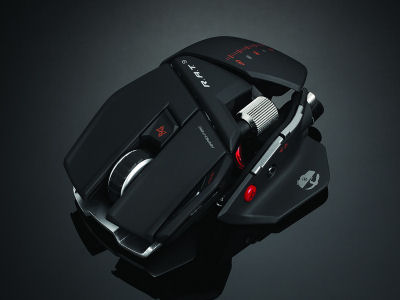
Mad Catz Cyborg R.A.T. Mouse
Overall quality of the mouse is also important. Mice are used extensively even while you aren’t gaming. With such heavy usage, they tend to wear off. The scroll wheel and the mouse clicks are usually the first to fail. The pads at the bottom of the mouse also take a battering. Look for mice with solid mouse clicks and scroll wheels. Opting for smooth fabric-based mousepads over hard pads might be a good investment as well. They help the mouse glide and so wear on the mouse feet is also reduced drastically. There are some other nifty features being added to new mouse, such as the ability to store your settings and profiles in the mouse’s internal memory, so you can move from one PC to another without losing your customized settings. Once you do get the mouse you wanted, you're ready to take on the world of competitive gaming. Just make sure you have the sensitivity for the mouse setup right, and you're good to go!

Saturday, 16 June 2012

Get gaming with budget Mice


No PC gaming enthusiast is ever going to be content with a typical  5.38 $ mouse from the local store. He’s looking for something that’ll give him the edge over the rest when it comes to online multiplayer games. When someone decides to spend 896.70 $ on a high-end gaming rig, it’d be wrong to skip out on a decent mouse. While mice start from as low as a 1.79 $ and go right up to 143.47 $ and more, the sweet spot for a good gaming mouse is between Rs 17.93$ and 44.84 $. Here are a few such options that should get you on your way.


GiGabyte m6800

There used to be a few good gaming mice under the 17.93 $ bracket. The Logitech MX310 used to be popular while the MX518 was new, but since then, very few manufacturers have been able to offer good performance, let alone features and design, at that cost. The most unlikely brand has an offering though. The Gigabyte M6800 happens to be a solid performer and a decently sized mouse for gamers. Priced at around 12.55 $, it’s easily one of the cheapest performance mice around.


Logitech mX518

The Logitech MX518 is legendary. It’s more than four years old now and it’s still got a ton of firepower.  There have been some revisions and changes since the first model launched, but the recipe hasn’t change a lot – a 1800 DPI sensor, a fancy looking design with great quality click buttons, DPI switches, an ergonomic design, and solid build quality. If you’re looking for a newer model with similar traits, look out for the Logitech G400. It’s almost identical in terms of size and ergonomics, but has an upgraded sensor. Although not officially released in India, you may be able to find it on some online stores or with some retailers.

Razer DeathaDDer 3.5G

Razer has been in the gaming mice market for more than a decade now. Their DeathAdder mouse has gained a reputation for being one of the best and popular mice for competitive gaming. The DeathAdder 3.5G, like the newer MX518 mouse, is updated with a new sensor while the rest of the mouse has stayed exactly the same for a while.


RAZER ABYSSUS

The Abyssus is at the base of the product pyramid from Razer. It offers a good amount of performance in a simple body and a simple set of buttons. For most gamers, this is more than enough. The price of  26.45 $ makes it as affordable and lethal as the MX518, although it isn’t as solidly built.


COOLER MASTER SPAWN

The Cooler Master Spawn is the weirdest looking mouse of the lot, but it’s quite a performer and the comfort level of the mouse is pretty impressive. Priced at just under 35.87 $, it’s a great purchase if you have a large palm and use the palm grip. It uses a 3500 DPI sensor, supports 1000 Hz refresh rates and supports storing of profiles in the internal memory.

Tuesday, 12 June 2012

Super Cheap HTPC


Have an old PC or laptop lying around? Why not convert it into an HTPC and enjoy your music and movies stored on it or streamed from a centrally located media server.


Most of you will have a desktop PC or laptop just lying around simply because it’s either too old for daily use and the resale value is too low for you to bother with it. Why not convert it into an HTPC (home theater PC) for use in your living room or bedroom? You don’t need any large capacity hard drives, high-end graphics cards or even an expensive operating system for the HTPC conversion. All you would need is your bank of media files either stored on the hard drive, external storage or on a DLNA/UPnP compatible NAS. 
On booting from the USB drive, choose the XBMCLive option unless you intend
to permanently install the XBMC OS on your PC's internal hard drive.
                                
You need to initially setup the networking parameters. Unless your router
assigns the IP address via the DHCP server, you should specify the IP address.
Once done, you must add the source of your media files, be it the internal hard
drive, a USB storage, a NAS, PC or SAMBA share, or DLNA server.
Select the source(s) accordingly and add them to the list. Once done, you will be
able to select the source of your media files in the begining.


                       In this workshop, we will show you how you can use XBMC Live (formerly known as Xbox Media Center) on an old PC and connect it to your LCD TV to enjoy your movies and music on the network. XBMC is an open source cross-platform media player and home entertainment system application designed for a living room TV. It has a graphical user interface and allows one to play video, photos, music and podcasts on your TV. XBMC Live is a free Ubuntubased Linux distribution with XBMC for Linux pre-installed and pre-configured, and hence we can avoid the purchase of an expensive operating system such as Windows. For this workshop, all you need is a regular x86-based PC and a blank CD or a 1 GB USB pen drive. Your media files can either be on your PC’s internal hard drive, external storage on a media server available on your network. This server can either be a Windows PC with Windows Media Player configured to stream your movie collection, a DLNA/ UPnP compatible NAS, or a router which holds your entire media collection. 
                                First, download the XBMC Live distribution from ‘www.xbmc.org’ or use the ISO distribution in the CHIP DVD. Download a utility called ‘UNetbootin’ for Windows from http://unetbootin.sourceforge.net. This application will help you create your XBMC Live USB drive, unless you prefer burning the ISO file onto a CD. That’s all; the XBMC Live media center is ready to play your favorite flicks over the network. 
                                Connect the PC reserved for the HTPC to the LCD TV (VGA/HDMI, whichever is compatible), run your audio wiring accordingly (from the PC to the home theatre speakers or amplifier), configure the BIOS to boot from USB/CD ROM and boot the PC from the USB/CD drive. You will shortly be taken to the XBMC user interface, where you can select the ‘Live’ option. 
Add-ons and plug-ins for XBMC for playing movies and music over the Internet
can be downloaded from XBMC's interface itself.
                                If your media collection is on the internal hard drive or an external USB storage, make sure you have the drive connected before powering up the HTPC. Once the XBMC media center is running, you can browse through your collection and enjoy your favorite flicks. If your media files are located on the network server, you will need to configure the network card or WLAN adapter. Also make sure you have connected the network cable before XBMC is booting. Usually, XBMC, being based on the Ubuntu Linux distribution, installs the network drives by default. If your PC is fairly new, you might need to download the necessary drivers and setup the network accordingly. In case you face any troubles with XBMC, you can always refer to the ‘xbmc.org’ website for any issues. The website also features downloadable skins for tweaking the user interface. Additionally, you can use your Wi-Fi capable mobile phone or a Windows Media Center remote as a remote controller or you can also use XBMC to act as a media server on your network. There are several other features in XBMC waiting for you to be discovered.

Saturday, 9 June 2012

More on IP concealment

We are all aware of what IP addresses are. Let’s get to know the different methods for IP concealment and how it works.

                             
                                 Although diff erent users use different technologies, all anonymizers have one thing in common. Whoever wants to surf anonymously needs an anonymous IP. Here, the user can pick between three methods i.e. VPN (Virtual Private Network), Onion Routing and Mix cascades. In the case of VPN, the user must first install a client software, which latches itself on to the system and automatically intercepts all packages sent in the network. Thus, the enquiries first go to a server via an encrypted tunnel and this server forwards the user to the respective website with a new IP. The accessed URL remains invisible for the private provider. Only an anonymous IP is forwarded to the website operator. VPN servers are extremely quick but have a fundamental disadvantage. The client must be able to trust his provider. This is because although the user surfs anonymously outwardly from there on, his complete data is available on the servers of the VPN service. If a hacker ferrets out this server, he gets the IP address of the user and, if available, even the user name and log-in password for the VPN client. Theoretically, even the authorities have it easy here. The Data Retention makes it mandatory for German VPN operators to hoard up the IP addresses. Whether and in which scope they need to release the IPs of the user has not yet been explained conclusively. Just two months ago, the District Court of Bamberg decided that an anonymizer service cannot indiscriminately be forced to give out the data of its clients, it is compelled to do that only in the case of severe criminal offences.                      

                                   The Onion Routing, for instance the Tor network has a completely diff erent approach than that by VPN. Here, the user does not use a fixed server but many free proxy servers. A website enquiry is sent via three Tor servers that are constantly changed and re-encrypted at every station. Identifying a particular user in this network is barely possible. The connection can be monitored if the invader keeps a check on the first and last node. But this does not lead to a complete user profile since the connection changes every ten minutes. Even then, monitoring one session would suffice to obtain sensitive data. 
                                   Mix cascades are also configured like the Onion Routing, for e.g. John Doe where the user connects to a server (Mix) that encrypts the enquiry and forwards it to other servers (mix cascades). But instead of using free nodes here, the operators back specific providers. All users that surf using the same mix cascades are also forwarded over the same route. Thus, it is possible for the server to mix the connection data of all users to additionally complicate the traceability of a person. 
                                  The data retention problem also principally applies to the mix cascades. However, it can be dealt with, if the client can determine the location and the operator of the mix. If he uses three servers from three different providers for instance, tracing back would only be possible with a lot of effort. Moreover, if the mixes are in three different countries, the chances of the data snooper are almost nil.

Thursday, 7 June 2012

Tech Detox: Knowing When to Cut the Cord

"Too much of anything is harmful, and technology is no different. While tapping away on your smartphone, you might beg to differ, but try staying away and see how restless you become."

"He is always on Facebook” goes the jingle of a leading telecom company that has come out with a device that personifies social networking. And it aptly describes the lives of most us, who are constantly engrossed in the virtual world, be it Facebook, Twitter or anything else. The Internet plays a huge role in all aspects of our lives today: work, leisure, gaming or staying in touch with friends. While all of us are dependent on technology, many of us are addicts who pretend not to care or believe. But we cannot ignore the fact that we are spending more and more time tending to our virtual lives, and this can have far reaching effects.

Are you an addict?
There is a fine line that separates compulsive use and dependence. You have to look inwards and ask yourself whether you are spending too much time online.
                   Do you set an alarm just to wake up in the middle of the night to harvest virtual crops so that they don’t wither? If for some reason you cannot access the Internet, do you feel anxious that you may be missing something important? Do you constantly check your phone for updates? Can you ignore your phone even when it’s flashing to indicate that new messages have arrived? Do you sit down at your PC/laptop as soon as you reach home? Do you check your phone as soon as you open your eyes in the morning? These are just a few examples of over dependent behavior, pointing towards addiction. 
                   While many might argue that they need to stay connected 24x7 because of work, little do they realize that this in itself points towards the fact that technology, and our over-dependence on it, has blurred the lines between work and leisure. If you want to be sure, then just switch off your phone and stay away from your PC or laptop for a day. Depending upon how easy or difficult you find it and what you miss the most, you will have your answer.

Why detox?
While it’s true that the Internet and smartphones have made it easier to communicate with people around the
world, they do also hamper our ability to communicate in real life. Where we would have shared thoughts with friends in actual face-to-face conversations, we are now content with status updates, tweets, and virtual conversations. When waiting at the bus stop, train station or even at a doctor’s clinic, it’s difficult to find a person sitting idle. More often then not, they will be bent over fiddling with their phones. This need for constant stimulation is like a drug. 
                   Technology, though convenient, has somewhat undermined our ability to focus or even have face-to-face conversations. For instance, even when having dinner with a bunch of friends, you will find people often checking their phones, or worse still, carrying on an SMS conversation. More than anything else, it has become a constant distraction. With computing becoming increasingly personal and phones becoming smarter, we find it difficult to switch off. The example of waiting up late into the night and setting alarms to wake up in time to harvest FarmVille crops was the real story of one particular girl in her mid 20s. The mere thought of her virtual crops withering away was unbearable to her. Constant nagging from her friends about her addiction didn’t help either. It was only when she was pulled up for farming at work that she realized her addiction was getting out of hand. She then deactivated her account for some time to help her get over her addiction. It was only when she actually tried to get over her addiction that she realized just how much time she had been devoting to a relatively useless activity when she could have spent it more productively. 
                     The recent Blackberry service outage acted as an eye-opener for many, making them realize just how dependant and used to the service they had become.Take the case of Simran Channey, a 26 year- old marketing executive and BlackBerry user for almost two years, who was deeply affected. She says, “It gave me sleepless nights because I am addicted to Twitter on BlackBerry and often, when I don’t get sleep, I surf on my phone”. So great was her frustration that she even toyed with the idea of switching over to another phone. She was not alone, as many other BB addicts shared her anxiety of feeling disconnected. For others, like Desiree Fernandes, a 26 year-old account head with a TV channel, who has been using a BlackBerry since 2008, the outage acted as a blessing in disguise. “I was affected a little, but at the same time was relieved from the nonstop emails and forwards,” she says. “The breakdown helped me revisit my old life and I quite liked the break.” The service outage, though a blot on the service provider’s track record, at least provided an opportunity for some people to come to terms with their dependence. Others, however, still need to go on forced detox sessions. If you find it difficult to spend even half an hour without feeling the urge to connect to the virtual world, then you most probably need a tech detox. This doesn’t necessarily mean switching off completely, as it would be impractical to do so in this day and age. It has more to do with making a conscious effort to reduce the amount of time that your spend online. Initially, you may find it difficult, as you battle with feelings of anxiety about missing out on conversations or important happenings,
but if you keep yourself engaged in other activities, it shouldn’t be that difficult. You never know; you might just rediscover an old hobby or begin enjoying new types of activities.

There are several groups on Facebook itself that talk about Facebook addiction, its symptoms and what
needs to be done to resolve it.

Here are some ways in which you can detox
  • The most effective remedy for tech detox is to switch over to a basic phone. No apps, no Internet access.
  • Stick with EDGE rather than 3G. The speed will frustrate you and keep you from picking up your phone out of convenience.
  • Periodically, select Flight Mode on your phone, which effectively cuts you off from all means of communication.
  • Another option is to get rid of social networking apps altogether as well as apps that you use to chat like Fring, WhatsApp, Nimbuzz etc.
  • When you are out with your family or friends, switch off the phone.
  • It might be easier if you encourage your friends to detox along with you.
  • Set limits for your gadget usage, for example, switching off your phone and shutting down the PC after 9 pm.
  • Make conscious efforts to have meaningful conversations with the people around you.

Wednesday, 6 June 2012

Windows Phone OS - 100,000 application

Windows Phone OS is now officially part of the major league, folks. The Marketplace for Microsoft's mobile OS has made it past the mark of 100,000 application submissions, thus joining the likes of Android and iOS as part of the elite club.

It took the platform the relatively short 20 months to reach the magic number - that's quicker than Android (24 months), but slower than iOS (16 months).
Out of the 100,000+ submitted apps, 88,371 are available for download across 60 countries. That number is bound to increase with around 300 every day. Don't be surprised however, if the pace picks up even further - after all, Windows Phone Apollo is right around the corner.
If you are into more of these numbers, continue to the source link below.
Source

Tuesday, 5 June 2012

Relocate Your Applications

Learn how you can safely relocate your installed programs from drive C to drive D or E.

You partitioned your hard drive initially and loaded the operating system, and now you realize that your C drive is running low on space while D drive is lying empty? You are now left with two options— uninstall space-hogging applications and reinstall them on the other drive, or resize your existing partitions using a partition management utility. The latter option is better as you can allocate the space permanently to drive C, but the threat of losing all your data in one go is high in case you accidentally reset your PC or witness a power failure. The first option is a faster one and would only affect the particular program it moves in case of any errors. Then again, this process is painstakingly slow. We will show you a simple utility which can relocate the programs from one drive to another in a few minutes. Download the utility ‘Application Mover’ from ‘http://www.funduc.com/app_mover.htm’ and install it. Run the program after installing.


Step 1: On the main screen, you must specify the two paths to the programs which need to be moved. Choose the current and new path accordingly. Leave all other check boxes untouched. Click ‘OK’.


Step 2: The next screen will confirm the files that will be moved. Confirm with ‘OK’, and the file operations will begin.


Step 3: A new window will open and you will be asked to finally confirm the replacement of the program location. Confirm with the ‘Replace’ button for every file or simply check the ‘Do not ask me again’ box.


Application Mover moves all files from the old path (and any subdirectories under that path) to the new path. The program then uses these strings to make changes to the Windows registry, Windows shortcuts, .ini and Install.log files in the program path. The application performs its operations in the following order - Files are copied to the new path > Registry Changes are made > Shortcuts are changed > Files are deleted from the old path > .ini and Install.log files are changed. The utility is shareware and can be purchased for around 13.5 $. Another alternative utility is Steammover, but the cons are—it runs under Windows Vista and 7 only, works on NTFS and not FAT32, leaves shortcuts on C drive, and if deleted, the relocated program won’t work. 


Do’s and Don’ts: Do not move important directories (for e.g. C:\Program Files to D:\Program Files). The utility must be run with Administrator privileges. Do not move ‘My Documents’. Do not move ‘C:\Program Files\Common Files’. Programs must be shut down before moving. Backups must be taken to avoid mishaps. Moving MS Office is unsafe—do it at your own risk. Do not move antivirus applications. Do not move programs from one PC to another. Do not move programs over the network unless the shared drives are mapped to the PC. Do not install a new hard drive or USB drive which tends to replace the drive letter of the drive where the applications are relocated.

Sunday, 3 June 2012

Is Android the next Windows?


When using a Windows PC today, it’s easy to take for granted that the software will just work. If you need something new, just pop in a CD or download it from the Web—there’s usually no question of whether it will work or not. With the combined market shares of all available versions hovering around the 90 percent mark for well over a decade, Windows is effectively the standard that developers must adopt unless they have very good reasons for remaining available to only a small niche. It wasn’t always like this though, back in the early days of personal computers, multiple different platforms existed and it wasn’t always easy to share data between them, let alone entire programs. Software (including the operating system) became one of the main reasons you’d choose one platform over another, and when smaller players became unsustainable and the industry crystallized around the Windows and Macintosh, it was still software that differentiated them. There are various reasons for which the Mac platform didn’t gain as much popularity as Windows in the 1990s, but it’s always been a viable alternative. 
                      Today’s mobile devices are in a similar situation. We have a number of completely different platforms, mainly differentiated by their operating systems and all mutually incompatible. Differences aren’t limited only to the look and feel of the hardware and software, but extend to the kind of situations you’d want to use each of them in. Some have been developed with no-frills business applications in mind, some with games and multimedia, and some trying to bridge the two worlds. In many ways, Apple is playing the same game it played with desktop computers—tightly controlling the hardware and software to give users a premium and polished—if somewhat constrained—experience. This time though, it’s had a clear first-mover advantage, arguably defining the modern smartphone experience on its own. Recognizing that third-party software is key to the platform’s success, Apple also created the App Store, which we now know to be the center of the iOS ecosystem. Google, on the other hand, is playing things the way Microsoft did twenty years ago: building only the software, and letting anyone who wants it use it. To beat Apple’s early advantage, they decided to make it free of cost to manufacturers, and it’s paid off. That’s how we have dozens of models from various manufactuers, and also why there are so many differences in hardware, power, and usability. Android’s reach is now arguably greater than iOS’s, but it comes at the cost of stability, predictability, and now also security—the hallmark weaknesses of Windows. If Android continues to gain popularity, it will become the default choice for software developers, and thus become the standard that everyone else must become compatible with. In such a world, iOS, BlackBerry OS, WebOS and Windows Phone would live on as niche minority options, or some of them would die out entirely. Who knows, if Android truly is the Windows of the post-PC era, it might even overtake its desktop-bound ancestor as malware authors’ favorite target.

Saturday, 2 June 2012

ALIENWARE X51 - A Hard Core Review


Battlefield 3’s metro station is being bombarded with RPG’s and the grenades as the assault squads begin flanking your team from all sides. You and your squadmates try desperately to hold the fort, but your team is losing tickets rapidly and you’re finding it increasingly hard to hold them back. It’s edge-of-the-seat stuff as the enemy decents upon you last control point, already having seized the rest of the map. You and your squad form the last line of the defence in the face of sure defeat. Yet you remain resolute, determined to turn the tide once again in your favor, The battle is racy, the compact gory, your nerves are twitching, your finger tight on the trigger, when suddenly the moment freezes. The battle is paused. To your horror, the game has crashed.

The hard core gamer’s conundrum
For too long you’ve had to bear the frustrations of the unreliable PC hardware and freezing consoles ruining your gaming experience at the most inopportune moments. If only you had a better, hassle-free PC designed for hard core gaming. If only consoles could live up to all the promises. If only someone could pack a full-scale gaming PC into small chassis.
       What may seem like a distant dream, is now a reality. Enter the Alienware X51, the new gaming desktop gaming PC packed into such a sleek and compact design that it would put other PCs and consoles into shame. It has a makings of a game changer. It will metamorphose the life of a hardcore gamer.

The Form Factor
Before the inevitable comparison Microsoft’s Xbox 360 pops its head, let’s dig into the basics. Let’s look at the form factor first. The X51’s slim-tower chassis measures a tidy 3.25 inches high, 3.75 inches wide, and 12.25 inches deep making it only a little bit larger than the Xbox 360. It can stand upright and lie down flat on its side. Its slot-loading DVD burner will fit in with aesthetics of any media rack. Peep inside the X52 and you’d find a pure PC: it employs a Mini-ITX motherboard, desktop-level Sandy Bridge Intel processors, and a full-sized slot graphics card (rotated 90 degrees and connected via a riser card to the PCle 2.1 × 16 slot). The news is that the X51 has a full-length 3D card sand witched on the top of the motherboard. Its ability to accept a full-length 3D card means the X51 is the slim- tower gaming machine out there.

Cutting Edge
The X51 is rugged and power packed. It is black, It’s lean, and it has a full-sized graphics card. It is upgradable. It packs full-sized gaming PC components into a chassis only marginally bigger than a Playstation 3. It as many ports as desktops PCs twice its size. It is the one of the first computers to use the desktop version of Nvida’s Optimus graphics switching technology. Look carefully. There’s an alien head emblem on the front and on either side, pair of translucent talons. No, they are not redundant embellishment. The individually light up in colours of your choice. That ain’t all, though. If you are a component junkie, peer under the hood. It is cleverly engineering! In the X51 matte case, full-size desktop fit together like a 3D jigsaw puzzle. Every single components are modular and can be replaced and upgradable with minimal effort and in an incredible short time. And there is not even hint of wasted space inside. If this is not cleverest engineering, what is?
         So much. But what’s the pedigree? Did you question the DNA? Do not. Look at the name. It is Alienware. It bears the Dell tag.
         So, what is so special about the Alienware X51? The console gaming space is already cluttered with big names like Xbox and Playstation. Why the X51? Okay, let’s admin the X51 neither the biggest nor the most powerful gaming PC the Dell owned company has ever unveiled, but it is certainly is the biggest challenge to traditional consoles to date.

Cool Connectivity
That’s all? Wait. You ain’t heard it all. Its connectivity options are unparalleled – the X 51 has many ports as desktop PC’s twice its size. On the front panel, alongside microphone and headphone jacks, you’ll find a pair of USB 2.0 ports. The back sports not only a dedicated HDMI 4.1 jack, four USB 2.0 ports, two USB 3.0 sockets, Gigabit Ethernet, and a full 3.5mm surround sound jack set, but also both digital optical and coaxial SPDIF audio outputs interface with any surround system. There’s more – 802.11n Wi-Fi, twin DVI video outputs and mini- HDMI on the rear of the graphics card.


Power Punch
The Alienware X51 is one of the first computers to use the desktop versions of Nvidia’s Optimus graphics switching technology. In simply words, The X51 attempts to save power by using the onboard Intel graphics when possible. You can get all the power of the dedicated Nvidia GPU through the full-size HDMI port without having use a special graphic card’s DVI and mini-HDMI outputs.
    Put, simply, Alienware is offering a gaming PC packaged for mass consumption, and that too at a price that does not burn in the gaming animal’s pocket. The X51 is a bang-for-the-buck machine. It is reasonable priced. It is solidity built. It is even portable. Moreover, Its upgradable , so you do not need to fret about the tomorrow’s games. It is a powerful home computer, and if you jingle a few extra coins, it can also transform into transform into a Blu-ray player.
         The Alienware X51 is a game changer, designed transform your experience unlike anything else before it. Surrender to the X51! Resistance is futile.

Friday, 1 June 2012

Toshiba Qosmio X500


"GOOD MULTIMEDAIA PERFORMER, BUT A TAD PRICEY."


For: Large screen, good speakers, good looks, Blu-ray writer.


Against: A bit expensive, flimsy build quality, GPU is a bit
dated, no USB 3.0.


Toshiba have gone with a bold and snazzy look for the X500. The bright red LED lighting gives it a very attractive look. The chassis is made up mostly of plastic, which isn’t very strong. There’s quite a bit of flex in the lid, which should not have been. Also, most areas have a glossy finish, so fingerprints and dirt are a nightmare. The hinge seems sturdy enough, allowing the screen to tilt back 160 degrees. At 4.75 kgs, you can’t even think of lugging this around as it’s too heavy. This is the first gaming notebook we’ve come across that sports a 18.4-inch full HD screen, which is simply gorgeous. 
                    There are four USB 2.0 ports in all (one ESATA combo) with sleep and charge function; no USB 3.0 ports though. Other features include HDMI, FireWire, Blu-ray writer, Express card slot, headphone and microphone jack and a VGA port. One thing we noticed was that the fit and finish of the chassis wasn’t very good. There were plenty of gaps around the optical drive and the ports didn’t fit well in the cut-outs of the frame. Overall, the build and finish wasn’t up to the mark; certainly not something you’d expect from a high-end gaming notebook. 
There are four USB 2.0 ports in all (one ESATA combo),
but no USB 3.0 ports.
SPECIFICATIONS
Dimensions (W x D x H): 44.2 x 29.4 x 4.6 cm; Weight:
4.75 kg; Processor: Intel Core i7-2630QM, 2.0 GHz;
RAM: 4 GB; Hard Disk: 750 GB; Optical Drive: Blu-Ray
writer; Display: 18.4 in, 1920x1080; GPU: GTX 460M;
Connectivity: 802.11b/g/n, Ethernet, HDMI, USB 2.0,
eSATA, FireWire; OS: Windows 7 Home Premium
                    The Harman Kardon speakers have large drivers, which can clearly be seen through the grill. A bunch of touch sensitive media keys are placed on the left, which is really annoying since you accidently hit them every time you start to type. The X500 is powered by the latest Intel Core i7-2630QM, which runs at a stock speed of 2.0 GHz, and can Turbo up to 2.9 GHz. Additionally, there’s 4 GB of RAM, a 750 GB hard drive and a Nvidia GTX 460M graphics card. The X500 is pretty well-equipped for a gaming notebook other than the fact that the graphics card is slightly old. While the CPU performance is solid in most benchmarks, the graphics card shows its age in the gaming tests.The X500 runs relatively cool and quiet even when stressed. The backlighting of the keyboard is even, but the keys themselves could have been designed better. The shortcut keys on the left could have been placed elsewhere as they always get in the way. They make an annoyingly loud beep every time you press them and there’s no way to disable that. 
                    The Harman Kardon speakers are one of the best in a notebook. The soundstage is wide and they are able to reproduce clear highs and mids. The low end is notvery pronounced, but then again we don’t really expect it to be. The X500 is fitted with a 12-cell Li-ion battery which lasted only 1 hour 20 mins on Battery Eater Pro, which is average.Toshiba has priced it at Rs 1,00,990, which is not bad considering the large screen and great speakers. There are some minor niggles, like the average build quality, annoying shortcut buttons, and the outdated graphics card, which makes this price tag seem rather high.